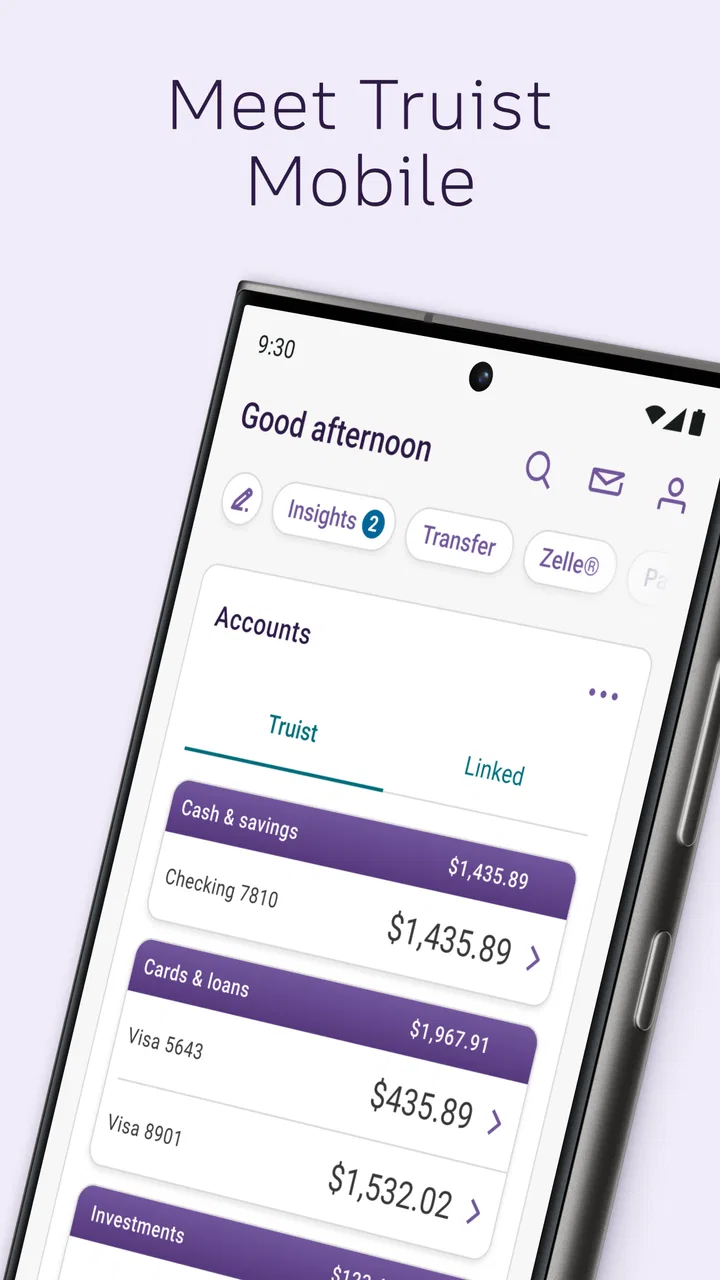
Truist Mobile
- 4.8
- Rating
- 1.00M
- Installs
- Free
- Price

 Analysis by App-foxy
Managing money from a phone sounds simple until the moment you need to check a balance, move money, or confirm a transaction while you are away from a branch. I spent time with Truist Mobile as a finance app and found that its real value depends less on flashy extras and more on how smoothly it fits into ordinary banking moments. It is built by Truist Financial Corporation, and the free app is aimed at people who already use Truist and want their everyday banking close at hand.
My overall impression is positive, especially for routine account checks and quick decisions. The app has an average rating of 4.8 from around 359 thousand ratings, with more than a million installs, which suggests that it has reached a substantial mobile-banking audience. Still, a banking app is only as useful as its access to current account information, so the quality of your connection becomes part of the experience. When the network is stable, the app feels practical. When it is weak or interrupted, even a simple task can become a waiting exercise.
How Truist Mobile Feels When Your Banking Depends on a Connection
I judge mobile banking by what happens when I need to act away from home, not just by how quickly a screen opens. In this section, I look at the connection as part of the whole workflow: what I can check confidently, where I slow down, and how I recover when a session is interrupted. That practical starting point leads into the everyday situations where the app earns its place.
You May Also Like

 Blood Strike: 2.5 Anniversary
Blood Strike’s Loadouts Turn Every Drop Into a Tactical Gamble
A close look at Blood Strike’s custom loadouts: how fast access to signature weapons reshapes its battle royale rhythm, rewards preparation, and narrows the gap between fights.

 Pandora - Music & Podcasts
Pandora’s Music Is Easy to Start, but Harder to Recover
Pandora’s strength is its low-effort path from a seed to a station. Its weak spot is how much confidence it asks you to place in connection, setup, and quiet recovery.

 8 Ball Pool
 Is Built on Rivalries, Rematches, and Routine
A close look at the rivalries, rematches, shared routines, and unanswered safety questions that turn a quick pool match into a persistent mobile community.

 Samsung Music
’s Quiet Strength Is Playing What You Already Own
Its reach comes less from spectacle than from dependable access to a personal library. That simplicity is both the app’s strongest retention engine and its ceiling.

 AccuWeather: Weather Radar
AccuWeather Review: A Quick, Clear Forecast for Everyday Decisions
For everyday plans, the best forecast is the one you can understand quickly. AccuWeather makes rain timing, radar, and local conditions easy to act on, with a few trade-offs.

 Hill Climb Racing
Why Hill Climb Racing Still Turns Crashes Into One More Run
A tiny car, a bumpy hill and one more upgrade: Hill Climb Racing keeps resurfacing because its simple chaos makes every near-miss feel personal.
More From Our News Desk



Checking money while life is moving
The most natural use case is the quick financial check: I am standing in a shop, looking at a bill, or deciding whether a payment can come out of my account today. Opening a mobile banking app in that situation is not about spending several minutes exploring menus. I want a current view of my finances and a clear path to the action I need. Truist Mobile is designed for that kind of short interaction rather than for replacing every conversation I might have with a bank representative.
That makes connectivity important in a very practical way. A balance or transaction view is useful only when the app can communicate with the bank’s systems. On a strong mobile signal or reliable Wi-Fi, the experience is much easier to trust because screens load without making me wonder whether I am looking at an old state. In a crowded store, underground parking area, or building with poor reception, the same task can feel less certain.
I would not treat a stalled screen as proof that a payment failed or that an account has not changed. My advice is to pause before repeating an action if the connection drops during a sensitive step. Checking again after the signal returns is safer than tapping repeatedly and creating confusion about what was actually submitted. That habit is useful with any banking app, but it matters especially when the interface is being used in a hurry.
A realistic everyday scenario
Imagine that I am about to pay a large household bill from my phone. I open the app over cellular data, review the available funds, and begin the payment process. If the connection remains steady, this is exactly the kind of task for which a mobile banking app earns its place. I can deal with the bill without waiting until I reach a computer, and I can immediately review the result inside the same banking environment.
Now imagine the signal fades after I submit the request. The temptation is to try again immediately. I think that is the wrong approach. I would first wait for a reliable connection, reopen the relevant account activity, and look for evidence of the transaction before submitting anything twice. The important insight is that connectivity is not just a loading issue; it affects how confidently you can interpret what happened.
For frequent travelers, commuters, and anyone who handles money between locations, this distinction is worth remembering. The app can make banking more convenient, but it does not remove the need for judgment when the network is unstable. A fast interface cannot guarantee a fast or complete transaction if the phone cannot maintain communication.
What works well in different mobile settings
At home on dependable Wi-Fi, Truist Mobile is easiest to use for a calm review of recent account activity. This is where I would organize my thoughts, compare a transaction with a receipt, or prepare for a transfer. The larger advantage is not that the phone becomes a full desktop replacement; it is that I can handle the task without opening another device.
On cellular data, the app is more useful for short checks and time-sensitive decisions. I can see why someone would prefer it to waiting until they return home. However, I would avoid beginning a complicated financial task in a location where the signal is visibly inconsistent. A train platform, a basement, or a busy event venue may be fine for checking whether I received money, but less suitable for a multi-step action that I need to verify carefully.
Public Wi-Fi introduces a different kind of hesitation. Even when a network appears fast, I prefer using a connection I trust for banking. That is not a criticism unique to Truist Mobile; it is a sensible boundary for financial apps generally. The app makes mobile access possible, but the responsibility for choosing a suitable network still sits with me.
Small habits that make mobile banking less stressful
One useful workflow is to separate quick observation from financial action. If I am only checking whether a deposit or payment appears, I can do that briefly. If I need to move money or submit something important, I first make sure the phone has a stable connection, enough battery, and a few uninterrupted minutes. This simple separation reduces the chance of acting impulsively because I am standing in a queue or rushing between appointments.
Another helpful habit is to keep a mental record of what I intended to do before tapping the final control. If the screen freezes, I then know exactly what I need to verify later. I do not rely on a spinning indicator as confirmation, and I do not assume that closing the app tells me whether the bank received the request. That may sound cautious, but it is the kind of discipline that makes a mobile banking tool safer to use.
I also found that the app makes the most sense when it is part of a broader routine rather than the only place I think about money. For example, I might use Truist Mobile for immediate account awareness, then review my monthly budget separately. The app’s strength is access to banking tasks in the moment; it should not automatically be treated as a complete financial-planning system.
When a connection fails
Connectivity failures are most frustrating when they happen after I have entered information but before I can tell whether the action completed. The right recovery method is deliberately boring: stop tapping, restore a reliable connection, reopen the app, and inspect the account activity before attempting the same action again. If the status remains unclear, I would contact Truist through its official support channels rather than guessing.
This recovery approach also answers an important question new users may have: should the app be trusted during a network interruption? I would trust it as a tool to check again once the connection is restored, not as a reason to assume that an incomplete screen equals a failed transaction. The app cannot make an interrupted network behave like a stable one, so patience is part of using it well.
There is also a difference between a temporary connection problem and a broader account or service issue. If other apps are failing too, the phone or network may be the cause. If only the banking task remains unavailable after reconnecting, I would avoid repeated attempts and seek help. That distinction prevents me from turning a small technical problem into duplicated payments or unnecessary account changes.
Using it without wasting mobile data
For most people, ordinary banking sessions should not be a major data concern, but I still prefer to be sensible when using cellular service. I would use Wi-Fi I trust for a longer review and reserve mobile data for quick checks when I am away from home. The benefit is not only conserving data; it also gives me a more stable environment for reading transaction details carefully.
A data-conscious workflow is especially useful while traveling. Before leaving a reliable connection, I can decide which banking tasks truly need attention during the trip. Then, when I open the app on cellular service, I focus on one clear purpose instead of repeatedly refreshing screens. Refreshing without a reason does not improve a weak signal, and it can make the session feel more uncertain.
I would also keep the phone’s operating system reasonably current and install the app only from the official app marketplace. Truist Mobile supports devices running Android 9 or later, so people using older phones should check compatibility before planning around it. That minimum requirement is modest, but it still matters if someone is holding on to an aging device.
Who should use Truist Mobile?
This is a strong fit for an existing Truist customer who wants convenient access while commuting, shopping, traveling, or handling household finances between computer sessions. It is also suitable for someone who values quick account awareness and prefers doing routine banking from a phone rather than visiting a branch for every small question. The Everyone content rating makes it broadly approachable from an age-classification standpoint, while the actual usefulness naturally depends on having a Truist banking relationship.
I would be more cautious about recommending it to someone who expects a banking app to work as a complete offline wallet or as a full personal-finance coach. Its value is tied to connected access to banking information and actions. If your priority is detailed cross-bank budgeting, investment analysis, or a broad financial dashboard, a dedicated finance tool may complement it better. If your priority is managing a Truist account from a mobile device, the app is the more direct choice.
People who dislike handling important payments on a small screen may also prefer a desktop session or in-person assistance for complicated matters. The phone format is convenient, but convenience can encourage rushed decisions. I would use the app confidently for familiar routines and slow down when the amount, recipient, or timing deserves extra checking.
How it compares with the usual alternatives
Compared with traditional branch banking, Truist Mobile wins on availability. I can begin with a quick check without planning a visit or waiting for a business-hour interaction. The trade-off is that I am responsible for navigating the task, maintaining a connection, and recognizing when a problem needs human help.
Compared with desktop online banking, the app is better suited to short, location-independent moments. A computer remains more comfortable for extended review because the larger screen gives me more room to compare information and think. I see the mobile app as the fast-access companion to that experience, not necessarily a universal replacement for every banking session.
Compared with independent budgeting apps, Truist Mobile has the advantage of being closer to the bank account itself. That can make it the first place I look when I need current account information. A separate budgeting app may be better for combining accounts or studying spending patterns across a wider financial picture. The choice depends on whether I need direct banking access or broader financial organization.
Cost, support, and the practical decision
The app is free to download, which removes an obvious barrier for customers deciding whether mobile access is worth trying. That does not mean every financial service connected to an account is automatically free, so I would still read the terms attached to any specific banking action rather than treating the app’s price as a promise about all possible services.
Truist Financial Corporation is the developer, and that matters because users should know they are dealing with the bank’s own mobile presence rather than an unrelated money-management utility. If an issue involves account access, a disputed transaction, or a request that cannot be resolved inside the app, I would move to official Truist assistance instead of relying on informal advice from a third party.
The app was released on April 27, 2021, and its continued presence across a large installed base gives it the feel of an established mobile-banking option rather than a brand-new experiment. I would still judge it by my own phone, network, and banking needs. A high average rating is encouraging, but it cannot predict how smoothly every device or connection will behave.
My connectivity verdict
After using Truist Mobile, I see it as a practical finance app whose best moments are short, purposeful, and connected: checking an account before a purchase, reviewing activity after a payment, or handling a familiar banking task while away from a computer. Its biggest strength is convenience in real life, not entertainment or unnecessary complexity.
Its main limitation is equally clear. When the network is weak, the app cannot provide the same confidence as it does during a stable session, and users must be careful not to repeat actions simply because a screen has not updated. That is a manageable trade-off if I build good habits around connection quality and verification.
My recommendation is straightforward: if you bank with Truist and want dependable mobile access for everyday account management, Truist Mobile is worth trying. I would choose a trusted, stable connection for important actions, verify results after interruptions, and keep a desktop or official support route in mind for more involved situations. For that audience, it delivers a useful bridge between traditional banking and the way people actually manage money while moving through the day.
FAQs for Truist Mobile
01What features does Truist Mobile offer?
Truist Mobile provides users with a comprehensive suite of banking tools. You can manage accounts, transfer funds, deposit checks using the mobile deposit feature, and pay bills directly from your smartphone. Additionally, the app offers personalized insights into your spending habits, making it easier to track and manage your finances.
02Is Truist Mobile secure for banking transactions?
Yes, Truist Mobile employs robust security measures to protect your banking transactions. It uses encryption to safeguard your data and offers biometric authentication options like fingerprint and facial recognition. Regular updates ensure that any potential vulnerabilities are addressed promptly, providing a secure banking environment.
03How user-friendly is the Truist Mobile interface?
The Truist Mobile app is designed with a user-friendly interface that caters to both tech-savvy users and those new to mobile banking. The intuitive layout and easy navigation make it simple to access various banking features. Additionally, the app includes helpful tutorials and customer support options for any queries.
04Does Truist Mobile support multiple accounts?
Yes, Truist Mobile supports managing multiple accounts within one app. Users can easily switch between accounts, view balances, and transfer money between them. This feature is particularly useful for users who have both personal and business accounts, allowing seamless financial management.
05Can I customize notifications in Truist Mobile?
Truist Mobile allows you to customize notifications according to your preferences. You can set alerts for account balances, transaction confirmations, and payment reminders. This feature ensures you stay informed about your financial activities and can help prevent overdrafts or missed payments.
Pros
- User-friendly interface for easy navigation.
- Secure login with biometric authentication.
- Real-time transaction alerts keep you informed.
- Comprehensive account management features.
- 24/7 customer support via chat or phone.
Cons
- Occasional slow loading times reported.
- Limited customization of dashboard view.
- Some users experience login issues.
- Not all transactions update instantly.
- Requires frequent app updates.

Truist Mobile
Gallery